UX & Product Consultant · Toronto · Available Worldwide

Designing products that hold ground in regulated industries.

I partner with fintech, insurance, and legaltech organizations to turn regulatory complexity and legacy workflows into intuitive, high-performance digital products — from discovery through delivery.

0
Years in fintech, insurance & legaltech UX
0
Complex enterprise portals & products shipped
0
Domains: Insurance, Fintech, Legaltech & Advisory
0
Client return rate — partners who come back for more
Scroll
About

UX designer turned

product consultant.

Lida Alirezaei Lida Alirezaei UX & Product Consultant

I'm Lida — a Toronto-based UX and product design consultant with over a decade of experience embedded in some of the most demanding domains in enterprise software: insurance claims, cyber underwriting, broker portals, legaltech platforms, and financial advisor tools.

My work sits at the intersection of deep user research, systems thinking, and visual craft. I help organizations understand what their users actually need, then build the structure and evidence to align stakeholders and ship products that perform.

I operate through The Anchor Agency, my independent consulting practice focused on UX strategy, product design, and design systems for regulated industries.

View Resume ↗
Enterprise UXProduct StrategyUX ResearchFintechInsuranceLegaltechDesign SystemsFigmaUsability TestingDynamics 365WCAG 2.2Agile SCRUM
Practice Areas
01
UX Strategy & Research
Research teams uncovering what users actually need through interviews, usability testing, journey mapping, and competitive analysis. Strategy follows evidence, not assumption.
User ResearchUX AuditsJourney Mapping
02
Product Design
From information architecture through high-fidelity UI — interfaces that are precise, accessible, and built to scale across web, mobile, and enterprise platforms.
UI DesignPrototypingDesign Systems
03
Product Strategy
Helping product teams define what to build, in what order, and why — grounded in user needs, market positioning, and measurable business goals.
RoadmappingDiscovery0-to-1
04
Legaltech UX
Specialized UX for high-stakes legal platforms: evidence architecture, trauma-informed design, multilingual interfaces, chain-of-custody constraints, and privacy-first principles.
Evidence UXLegal IAMultilingual
05
Accessibility & Compliance
WCAG 2.2 and AODA-compliant audits and remediation — not just flagged issues, but complete design solutions built to include every user from day one.
WCAG 2.2AODAInclusive Design
06
AI-Integrated UX
Designing for agentic AI workflows, trust signals, and intelligent product surfaces — as AI reshapes how enterprise products behave and communicate.
AI WorkflowsAgent UXAI Strategy
07
Product Design Training
1-on-1 coaching and structured workshops for aspiring UX designers and career switchers — covering portfolio development, Figma, UX process, and interview preparation.
CoachingPortfolio ReviewWorkshops
08
Workshops & Facilitation
Structured design sprints, alignment workshops, and capability-building sessions — moving product teams from stuck to ship-ready, fast.
Design SprintsAlignmentTraining
Design Approach

Human-centred process.
Measurable outcomes.

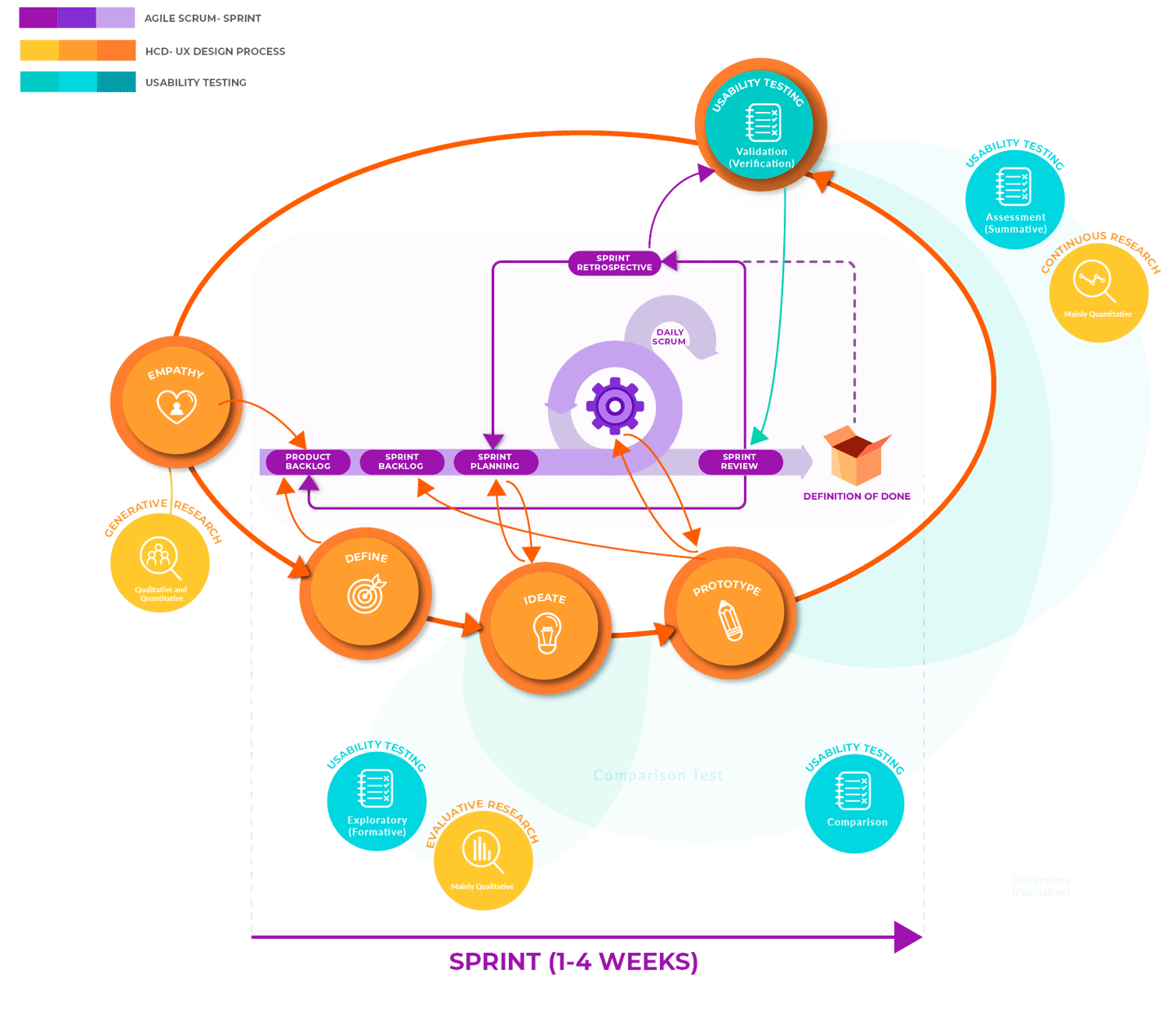
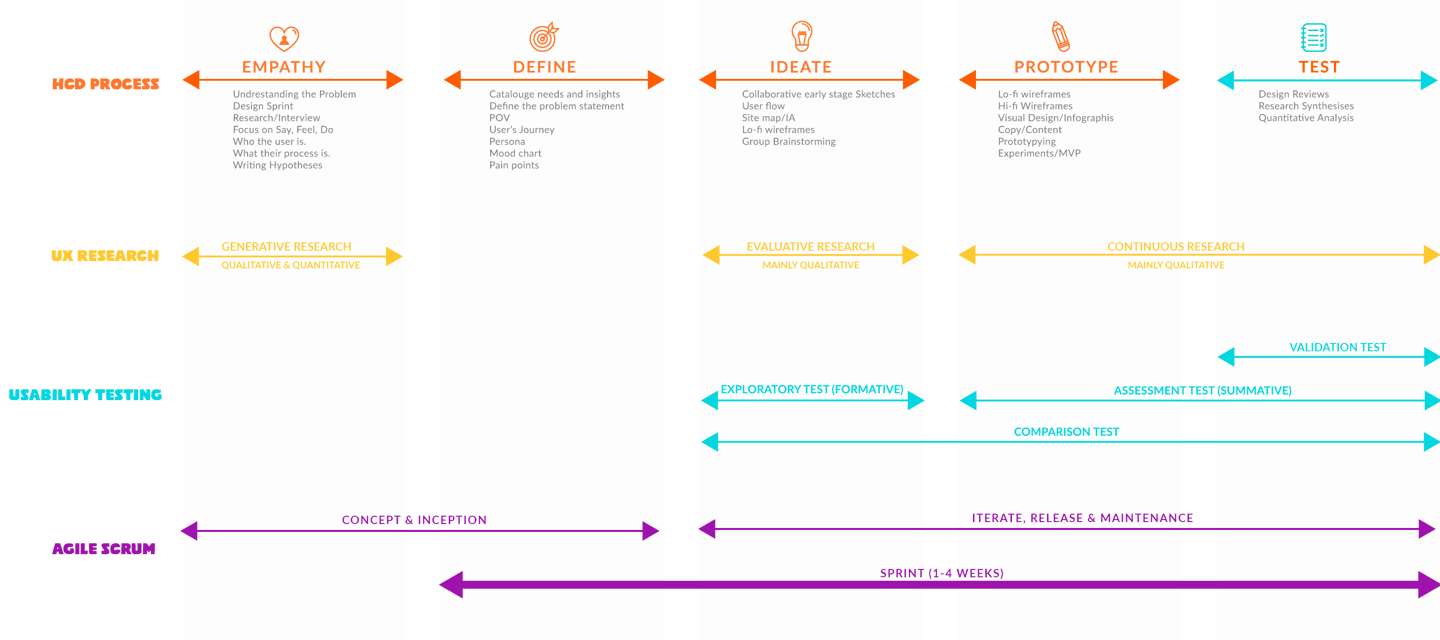
I employ Human-Centred Design (HCD) while extending it by incorporating the seven dimensions of usability throughout the entire process, following Agile methodology — placing users at the core of every decision.

Phase 1
Empathize
User interviews, contextual inquiry, shadowing, call analysis
Phase 2
Define
Personas, journey maps, problem framing, design principles
Phase 3
Ideate
User flows, wireframes, information architecture, ideation
Phase 4
Prototype
Interactive prototypes from lo-fi to hi-fi, rapid iteration
Phase 5
Test
Moderated usability testing, WCAG audit, data-informed iteration
HCD Design Process Diagram
UX Strategy
Evidence-first, always
Every design decision traces back to a user insight or a measured outcome. I don't design on assumption — I design on evidence gathered directly from the people who use the product.
Delivery
From ambiguous to shipped
My process bridges the gap between fuzzy problem statements and production-ready designs — with artifact handoffs (flows, specs, component libraries) that development teams can actually build from.

The Seven Dimensions of Usability

I prioritize all seven usability dimensions from the very first design decision — not as a post-launch checklist, but as active design constraints shaping every screen.

Effectiveness
Users achieve their goals accurately and completely
Efficiency
Streamlined workflows, minimal unnecessary steps
Learnability
Intuitive navigation — users find their way fast
Satisfaction
Delightful, engaging, trust-building experiences
Memorability
Users can re-engage effortlessly after any gap
Error Tolerance
Anticipates mistakes and provides clear recovery paths
Accessibility
WCAG 2.2 — effective and efficient for all users
Interaction Cost
Minimizing reading, scrolling, memory load, attention switches
Seven dimensions of usability diagram

Usability Testing — 4 Types I Apply

Type 1 — Formative
Exploratory Testing
Early in the cycle while the product is still being defined. Tests low-fidelity wireframes to quickly find what's working or not — preventing incorrect assumptions before a line of code is written.
Type 2 — Summative
Assessment Testing
Mid-development when users can interact with functioning prototypes. Users perform specific tasks and think aloud — helps focus on granular design aspects and their usability impact.
Type 3 — Verification
Validation Testing
Late in the cycle. Quantitative data collection — time on task, completion rate — measured against benchmarks, previous iterations, or competitor standards. Remote unmoderated for efficiency.
Type 4 — Comparative
Comparison Testing
At any stage. A/B testing or parallel testing of two or more design concepts — determining which workflows, patterns, or visual treatments resonate most with real users.

Agile Meets UX

Following Agile principles as an iterative and collaborative approach secures flexibility, adaptability, and continuous improvement. I work in 2-week sprints, embed with cross-functional teams, and iterate quickly based on user and stakeholder feedback.

Sprint 0
Discovery & Kickoff
Stakeholder alignment, research planning, problem framing — shared understanding before design starts.
Sprint 1–2
Research & Synthesis
User interviews, contextual inquiry, affinity mapping, persona and journey map development.
Sprint 3–4
IA & Wireframes
Information architecture, user flows, low-fidelity wireframes — tested before high-fidelity begins.
Sprint 5–6
Hi-Fi & Prototype
High-fidelity UI design, interactive prototype, design system component documentation.
Sprint 7
Usability Testing
Moderated testing, findings synthesis, design iterations applied before handoff.
Sprint 8+
Handoff & Support
Developer-ready specs, component library handoff, ongoing design support through build.
Cross-functional collaboration
Working inside the team, not beside it
I participate in sprint planning, backlog refinement, and stand-ups — not just design reviews. Designers embedded in agile teams ship better products than those who hand off and disappear.
Tools
Figma · Jira · Confluence · Miro
Figma for design and prototyping, Jira and Azure DevOps for sprint tracking, Confluence for documentation, Miro for research synthesis and collaborative workshops.

From Research Insights to User Flows

Streamlining research into intuitive design — a 10-step process I follow to translate UX findings into structured, tested interaction flows.

01
Understand the Research Findings
Thoroughly review user personas, goals, pain points, and all relevant insights from the research phase before touching a wireframe.
02
Define User Flow Objectives
Clearly identify what the user flow should achieve — improving UX, addressing pain points, or guiding users through a specific task.
03
Identify Key User Tasks
Based on research and objectives, identify the core actions users need to perform within the system. These become the backbone of the flow.
04
Define Entry Points
Determine all the ways users can access the system — homepage, dashboard, deep link — and design for each context of entry.
05
Map User Paths
Visualize different paths users take to accomplish tasks — using flowcharts, diagrams, and wireframes to represent sequences, decisions, and interactions.
06
Consider User Decision Points
Identify every point where users must make a choice. Design these to be intuitive, low-friction, and forgiving of mistakes.
07
Incorporate User Feedback
If usability testing data is available, incorporate it directly into the flow — addressing pain points and areas of confusion before hi-fi begins.
08
Communicate & Validate with Stakeholders
Share the initial flow with PMs, developers, and other designers. Validate alignment with project goals and gather input before committing to UI.
09
Iterate & Refine
Based on feedback received, iterate on the flow — adjusting step sequences, clarifying decisions, or resolving usability issues surfaced in review.
10
Document & Share
Document the final user flow clearly for developers, QA, and future designers — serving as a living reference throughout design and development.
Selected Work

Case Studies

Partners

Organizations I've
Worked With

BOXX Insurance
Equitable Life
Protective Life
Oliver Agency

Select client names shown with permission

Get In Touch

Let's talk about
your product.

Whether you need an embedded consultant, a research-led design sprint, legaltech UX expertise, or a long-term product design partner — let's start with a conversation.

lida.alirezaei@gmail.com
Resume ↗
Location
Toronto, Canada · Available globally
Practice
The Anchor Agency
Focus
Fintech · Insurance · Legaltech · Regulated Industries
Availability
Currently accepting new engagements